
Best Minecraft Bedrock Mods (2026 Guide)
Quick Answer: The best Minecraft Bedrock mods in 2026 include Better Bedrock (for HUD customization and UI overhaul), Jenny Addon (for companion gameplay), and Waypoints Plus (for enhanced navigation). Whether you want survival upgrades, visual enhancements, or quality-of-life improvements, Bedrock’s addon ecosystem now rivals Java in depth and variety.
Introduction: Why Minecraft Bedrock Mods Are More Popular Than Ever
Let’s be real — Bedrock used to get a bad reputation in the modding community. Java players would scoff, say the addon system was too limited, and tell you to just switch editions. That narrative is completely outdated now.
In 2026, the Bedrock modding scene has exploded. Thousands of creators are publishing addons, texture packs, and behavior packs every month. Cross-device compatibility means your mod setup works whether you’re on PC, mobile, or Xbox. The creator ecosystem has matured, monetization opportunities have drawn serious developers in, and the community support infrastructure — Discord servers, changelogs, tutorial libraries — rivals anything Java modding had five years ago.
If you’ve been sleeping on the best Minecraft Bedrock mods, this guide will change that.
What Are Minecraft Bedrock Mods?
Technically speaking, Bedrock doesn’t use “mods” in the same way Java does. What most people call mods are actually behavior packs and resource packs — the official Bedrock modding framework built directly into the game engine. Behavior packs change how entities, items, and world logic work. Resource packs handle visuals: textures, sounds, UI elements.
The term “mod” has stuck around because it’s easier to say, and honestly, the end result feels identical to the player.
How Mods, Addons, and Texture Packs Differ
These three terms overlap constantly, so here’s a clean breakdown:
| Type | What It Changes | Example |
| Addon | Gameplay mechanics, mobs, items, world gen | New biomes, boss fights, custom vehicles |
| Texture Pack | Visual appearance only | Realistic graphics, cartoon style, RTX-compatible look |
| Behavior Pack | Entity and world logic | Mob AI, crafting recipes, game rules |
| Resource Pack | UI, sounds, models, textures | HUD customization, menu redesigns |
Most “mods” you download actually bundle a behavior pack and resource pack together. That’s normal, and it’s why installation feels seamless.
Why Bedrock Players Use Mods
The base game is brilliant — nobody’s arguing that. But after a hundred hours, you want more. Maybe you want a waypoint system so you stop getting lost in your seed. Maybe atmospheric visuals and fog customization would make your survival world feel cinematic. Or perhaps you just want dark-themed menus because the default UI hurts your eyes.
Mods answer all of that, and more.
What You’ll Find in This Guide
This covers everything: the best individual mods by category, how to install them safely on every platform, how Bedrock compares to Java for modding, and how to build the perfect mod combinations for your playstyle. No fluff. Let’s get into it.
Popular Categories of Minecraft Bedrock Mods
Understanding the categories helps you build a mod list that doesn’t conflict with itself. Here’s what’s available and what each type actually adds.
Survival and Hardcore Mods
These ramp up the difficulty with user experience enhancements that make danger feel real. Temperature, thirst, wound systems, and hardcore respawn logic are all fair game. Good for players who find vanilla too easy after a few hundred hours.
RPG and Adventure Mods
Full quest systems, NPC dialogue trees, skill trees, and custom storylines. The RPG scene on Bedrock has grown massively thanks to the content publishing platform making it easier for creators to distribute large projects.
Building and Furniture Mods
The most popular category by raw download numbers. Players want beautiful spaces, and vanilla doesn’t give nearly enough furniture or decorative options. Audience reach for building mods consistently outperforms other categories on creator platforms.
Magic and Fantasy Mods
Spell casting, enchantment overhauls, and fantasy mob packs. The immersive experience these create pairs beautifully with adventure and RPG mods — stack them carefully to avoid addon conflicts.
Technology and Automation Mods
Machines, power systems, and factory automation. Bring a tech modpack feel to Bedrock. These are more complex to install and occasionally need specific global options set in the world settings to function properly.
Animals, Creatures, and Mob Mods
New wildlife, tameable creatures, and boss encounters. Custom mob addons are some of the most polished releases on Bedrock in 2026, with several reaching console support parity.
Weapons and Combat Mods
Guns, magic staffs, new melee types, and combat system overhauls. The strategic advantage from a good combat addon in PvP worlds is significant — not pay-to-win, just more depth.
Realism and Immersion Mods
Dynamic weather, realistic physics, and day/night cycle improvements. These mods live or die on performance optimization. Always check your FPS before and after installing realism packs.
Best Minecraft Bedrock Addons You Should Try
Addons are where Bedrock truly shines right now. These are full-scale gameplay modifications — not just visual sprinkles.
Better Survival Addons
Survival Plus Overhaul is the one to start with. Adds crafting depth, new tool tiers, and survival mechanics that stretch the early and mid-game considerably. It’s also one of the few addons with proper support documentation and an active Discord server for troubleshooting.
New Biomes and World Generation Addons
Biomes O’ Bedrock adds 30+ new biomes with unique mobs, resources, and structures. Cross-platform support is solid — tested and verified on PC, mobile, and console.
Custom Mob Addons
Mythical Creatures Pack brings dragons, giant spiders, and spectral wolves with actual AI routines. Not just re-skins — these behave as real boss encounters with configurable difficulty.
Vehicle and Transportation Addons
Boats, cars, motorcycles, and aircraft. The Vehicle Plus Addon is the community standard for this category. A gameplay utility feature that transforms how you travel in large worlds.
Boss and Challenge Addons
Structured boss fights are a big gap in vanilla Bedrock. Boss Raids Addon fills it with eight multi-phase boss encounters, each with unique mechanics and drop tables. The community engagement around this addon is remarkable — the creator actively posts news history, and release trailers.
Quality-of-Life Addons
These are the ones you install and immediately forget about, because they make everything just work better:
- Auto-sort inventory
- Larger chat window
- Improved death screens with item recovery
- Player convenience features like quick food access
- Feature toggles for default game behaviors
Quick List: Top 10 Bedrock Addons for Every Player
- Better Bedrock (UI + HUD overhaul)
- Waypoints Plus (navigation)
- Biomes O’ Bedrock (world generation)
- Survival Plus Overhaul (gameplay depth)
- Furniture Addon by Starfish Studios (decoration)
- Better Fogs (atmosphere)
- Mythical Creatures Pack (mob variety)
- Boss Raids Addon (challenge)
- Vehicle Plus (transportation)
- Optimum Bedrock (performance)
Best Minecraft Bedrock Texture Packs for Better Graphics
Visual upgrades are often the first thing new players explore, and rightfully so. A good texture pack transforms how Minecraft feels without touching gameplay at all.
Realistic Texture Packs
Realistico Bedrock Edition is the gold standard for photorealistic textures. Every block surface has layered detail. It’s demanding — a mid-range PC handles it fine, but mobile devices struggle.
Vanilla+ Texture Packs
The smartest approach for most players. Vanilla+ packs keep Minecraft’s artistic identity intact while sharpening details, improving lighting, and smoothing animations. Faithful 64x is the classic choice. Familiar enough that your muscle memory stays intact, refined enough that it looks noticeably better.
Cartoon and Stylized Texture Packs
Going in the opposite direction of realism. Packs like Cartoon Craft and Pastel Soft create a storybook aesthetic that’s surprisingly popular on family-friendly servers.
FPS-Friendly Texture Packs
For players prioritizing performance over visuals, Bare Bones is the move. It reduces texture complexity to a minimum while keeping the game’s color palette intact. Frames per second improvements of 20–40% are common on lower-end hardware.
RTX and Ray Tracing Compatible Packs
NVIDIA RTX Vanilla and Kelly’s RTX are the two most polished ray-tracing packs available. These only work on Windows PC with a compatible GPU. The visual result — real-time reflections on water, volumetric lighting through trees — is genuinely stunning.
Texture Packs for Low-End Devices
Ultra Low Craft and Performance Pack by Raft both reduce texture resolution to 8x or 16x, stripping everything non-essential. Counter-intuitively, some of these packs actually look charming in their own minimal way.
Texture Pack vs Mod: Which Should You Choose?
Start with a texture pack. They’re safer, easier to install, and reversible in seconds. Once you’re comfortable with how resource packs work, layering in behavior pack addons becomes intuitive. Don’t install ten things at once and wonder why the game is crashing.
How to Install Minecraft Bedrock Mods (Step-by-Step)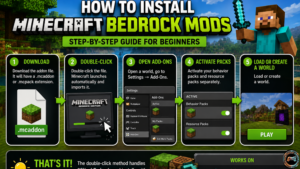
This is where most beginners get stuck. The process is simpler than people expect.
Requirements Before Installing Mods
You need the retail version of Minecraft Bedrock Edition — not the trial, not a cracked copy. Mods from unofficial sources won’t install correctly on non-retail versions. Also confirm your game is updated to the latest version, since most current mods target recent Bedrock releases.
Installing Mods on Windows PC
- Download the addon file. It will have a .mcaddon or .mcpack extension.
- Double-click the file. Minecraft launches automatically and imports it.
- Open a world, go to Settings → Add-Ons.
- Activate your behavior packs and resource packs separately.
- Load or create a world.
That’s genuinely it. The double-click method handles 90% of Bedrock mod installs without requiring any manual file moving.
Installing Mods on Android Devices
On Android, .mcaddon files need to be opened with the Minecraft app directly. Download the file through your browser, then tap it and select “Open with Minecraft.” The import process is automatic from there. If it doesn’t trigger automatically, navigate to your Downloads folder using a file manager, long-press the file, and select Minecraft as the opening app.
Installing Mods on iOS Devices
iOS requires downloading through Safari or a compatible browser, then using the Share menu to select “Copy to Minecraft.” Apple’s file restrictions make this slightly less intuitive, but the outcome is identical.
Installing Mods on Xbox and Consoles
Console support for third-party mods is limited to content purchased through the Minecraft Marketplace. Free community mods cannot be sideloaded on Xbox or PlayStation. This is the biggest limitation of console play versus PC.
How to Enable Behavior Packs and Resource Packs
Every world has its own pack settings. When creating or editing a world, scroll to the Add-Ons section. Drag your desired packs into the active slots. Behavior packs load first, resource packs second. Order matters if you’re running multiple packs — conflicts usually stem from incorrect load order.
Common Installation Mistakes to Avoid
Using outdated mod versions is the number one cause of crashes. Always match your mod version to your Bedrock game version. Installing conflicting behavior packs (two mods that both modify the same mob, for instance) causes unpredictable behavior. And never install mods mid-playthrough without backing up your world first.
Best Mod Combinations for Different Playstyles
Here’s where you get real value. Individual mods are fine — curated combinations are where the magic happens.
Ultimate Survival Mod Setup
- Better Bedrock (HUD and UI)
- Survival Plus Overhaul (mechanics)
- Waypoints Plus (navigation)
- Optimum Bedrock (performance)
- Better Fogs (atmosphere)
This combination adds survival depth, keeps your interface clean, and doesn’t tank performance. Run this on almost any PC without issues.
Builder’s Dream Mod Collection
- Furniture Addon by Starfish Studios
- Architect’s Dream (materials)
- Realistico or Faithful 64x (visuals)
- Vanilla+ UI resource pack
Builders don’t need combat or survival overhauls cluttering their pack list. Keep it focused.
RPG Adventure Mod Pack
- Epic Adventures Addon (world exploration)
- Mythical Creatures Pack (custom mobs)
- Better Combat Addon (fight mechanics)
- Boss Raids Addon (end-game content)
- Atmospheric Immersion resource pack
This combination creates a genuine RPG experience. Start a fresh world — this changes too much to layer onto an existing save cleanly.
Realistic Minecraft Experience Setup
- Realistico texture pack
- Better Fogs
- Dynamic Weather Addon
- Survival Plus Overhaul
Performance demanding. Only run this on dedicated PC gaming setups with a mid-to-high-end GPU.
Low-End Device Performance Setup
- Bare Bones or Ultra Low Craft (texture pack)
- Optimum Bedrock
- Simple HUD (lightweight UI mod, minimal resource use)
On older mobile devices or low-spec PCs, less really is more. These three packs give you improved gameplay utility features without making the game unplayable.
Family-Friendly Mod Collection
- Pastel Soft texture pack
- Animal Companions Addon (tame more mob types)
- Simple Furniture Addon
- Cartoon Craft (optional visual layer)
Great for younger players or casual co-op sessions. Nothing here adds difficulty or violence beyond vanilla levels.
Minecraft Bedrock Mods vs Java Mods
This debate runs endlessly in the community. Here’s an honest look at where each version actually stands.
Key Differences Between Bedrock and Java Modding
Java modding uses Forge, Fabric, and NeoForge — powerful loaders that let mods reach deep into the game’s code. Bedrock modding uses the official addon API, which is more restricted by design. Java mods can do anything essentially. Bedrock addons work within what Mojang explicitly exposes.
That said, Mojang has been steadily expanding the Bedrock API. Features that were impossible to mod on Bedrock two years ago — custom UI elements, advanced entity scripting — are now standard. The gap is closing.
Performance Comparison
Bedrock is the better performer, full stop. Vanilla Bedrock runs smoother than vanilla Java on identical hardware. With mods, the advantage holds unless you’re loading extremely complex behavior packs.
Installation Complexity
Bedrock wins here easily. Java modding requires installing Forge or Fabric, managing version compatibility, and dealing with dependency chains. Bedrock is mostly double-click-to-install. For beginners, this difference is enormous.
Customization and Features
Java wins on raw depth. More mods, more complex features, longer modding history. But the best Minecraft Java mods are often PC-exclusive. Bedrock’s addon system works across PC, mobile, and console — that cross-device compatibility advantage is significant for players who switch between platforms.
Which Version Is Better for Modding?
It depends on your priorities. If you want the deepest possible mod library and only play on PC, Java is the right call. If you want easy installation, console or mobile support, and seamless synchronization across devices, Bedrock is the smarter choice for most players in 2026.
Can Java Mods Be Used on Bedrock?
No. They use entirely different systems. Some popular Java mods have Bedrock equivalents created by different developers, but they aren’t ports — they’re separate projects built from scratch.
Are Minecraft Bedrock Mods Safe?
Short answer: mostly yes, if you use trusted sources. The longer answer requires a bit more nuance.
How to Download Mods Safely
Stick to established platforms: MCPEDL, CurseForge (for Bedrock content), the official Minecraft Marketplace, and creator pages linked from the Minecraft Discord server or YouTube channels. These platforms have community moderation and review processes.
Trusted Sources for Bedrock Mods
- MCPEDL.com — the largest community hub for free Bedrock addons
- CurseForge Bedrock section — moderated and version-tagged
- Minecraft Marketplace — paid, but guaranteed safe and console-compatible
- Direct creator pages with active Discord servers and changelogs
Warning Signs of Unsafe Downloads
Any site that asks you to complete a survey before downloading is a red flag. Executable files (.exe) bundled with Bedrock mods should never be run. Legitimate Bedrock mods only need .mcaddon, .mcpack, or .zip file types. If a mod description page has no screenshots, no changelog tracking, and no creator contact info, skip it.
How to Avoid Malware and Broken Addons
Use an ad blocker when browsing modding sites. Some ad providers on smaller sites serve malicious redirects. Download from the direct file link only — never from pop-up redirect pages.
Keeping Mods Updated
Bedrock updates frequently, and addons that worked three months ago sometimes break on new game versions. Check your mod pages after every major Bedrock update. Most active creators post release notes or UI updates announcing compatibility status. If a creator has gone quiet for more than six months, treat the addon as potentially unmaintained.
Troubleshooting Common Minecraft Bedrock Mod Issues
Something went wrong. Here’s how to diagnose it quickly without losing your save.
Mods Not Showing Up in Game
First, verify the addon was actually imported. Open Minecraft, go to Settings → Storage and look for your pack under Behavior Packs or Resource Packs. If it’s not there, the import failed — try the double-click method again. If it is there but not active, you need to enable it per-world in Add-Ons settings.
Game Crashes After Installing Mods
Almost always a version mismatch or addon conflict. Remove all recently installed packs, then re-add them one by one, testing after each. This isolates the culprit. Addon conflicts happen when two behavior packs modify the same entity or game rule — the game can’t reconcile both and crashes.
Texture Packs Not Loading
Texture packs not loading are usually a corrupted download. Re-download the pack and import again. Also check that your resource pack is in the active slot for the specific world you’re playing, not just installed globally.
Multiplayer Compatibility Problems
Behavior pack mods require all players to have the pack installed locally. If one player is missing a required pack, they’ll either crash on join or experience visual and gameplay errors. Coordinate with your server group before installing anything.
Performance and Lag Issues
Stack too many heavy addons and even strong PCs struggle. Run Bedrock mods in this priority for performance: performance packs first, then behavior packs, then resource packs. Remove any pack you installed purely for aesthetics if you’re experiencing lag.
Fixing Addon Conflicts
Use a conflict checker spreadsheet approach — list every addon you have active, what entity types or game systems each one modifies, and flag any overlaps. The Better Bedrock Discord server community support team has a pinned resource for this that’s genuinely useful.
Frequently Asked Questions (FAQ)
What are the best Minecraft Bedrock mods right now?
Better Bedrock, Waypoints Plus, Biomes O’ Bedrock, and Survival Plus Overhaul consistently top community ratings in 2026. Each one targets a different aspect of the game, so they work well together without conflicts.
Can you use mods on Minecraft Bedrock Edition?
Yes — through the official addon system using behavior packs and resource packs. The installation process is straightforward on PC and mobile. Console players are limited to Marketplace content.
Are Bedrock mods free to download?
Most community-created addons on MCPEDL and CurseForge are completely free. Marketplace content is paid. Some creators offer free base versions with premium extensions, funded partly through ad revenue generation on their content publishing platforms.
What is the difference between addons and mods?
Addons are the official term for Bedrock modifications — packaged behavior and resource packs. “Mods” is informal community shorthand. Functionally, they refer to the same thing in most conversations.
Can Bedrock mods work in multiplayer worlds?
Behavior pack mods require every player to have the pack installed. Resource-only mods (texture packs, UI changes) are client-side and only need to be installed by the individual player.
Do Bedrock mods work on mobile devices?
Yes. Bedrock’s mobile compatibility is one of its strongest advantages. Most addons from MCPEDL are tested on Android and iOS. Performance-heavy packs (realistic textures, complex behavior packs) may cause lag on older devices.
Which texture packs improve graphics the most?
Realistico and Kelly’s RTX deliver the most dramatic visual improvement for PC gaming. For mobile, Faithful 64x gives the best balance between quality and performance. RTX packs only work on Windows PC with ray-tracing capable hardware.
Are Minecraft Bedrock mods safe to install?
Yes, when downloaded from trusted sources like MCPEDL, CurseForge, or direct creator pages. Avoid sites requiring surveys, downloads in .exe format, and packs with no support documentation or active changelogs.