Is Fall Guys split-screen? Full Local Multiplayer Guide (2026)
You are not the only person asking if Fall Guys’ split-screen support is finally available in 2026. Thousands of players still want that classic couch co op feeling where two friends sit on the same sofa, grab controllers, and dive into chaotic obstacle course gameplay together.
Here’s the frustrating part. Fall Guys is built around online multiplayer sessions and cross-platform matchmaking, but local split-screen support still has limitations that many party games solved years ago.
Quick Answer
No, Fall Guys does not officially support split screen on PS5, PS4, Xbox, Nintendo Switch, or PC in 2026. You cannot play two players on one console using separate screens or shared screen gameplay.
You can still enjoy multiplayer with friends through the online party system, crossplay support, and cross-device gaming across PC, PlayStation, Xbox, and Nintendo Switch. For same-room gaming, you currently need multiple devices or consoles.
Introduction: Can You Play Fall Guys in Split Screen?
Most players searching “Does Fall Guys have split screen?” usually want a simple answer before downloading the game with friends or family. That makes sense. Fall Guys looks like the perfect couch gaming setup at first glance.
Bright visuals. Short rounds. Family-friendly multiplayer chaos. Everything about it feels designed for a local multiplayer experience.
Why players keep asking about split-screen support
Back when party games like Mario Kart, Rocket League, and Gang Beasts exploded in popularity, split-screen mode became almost expected. Players naturally assumed Fall Guys would include the same multiplayer flexibility.
After testing Fall Guys during several local gaming nights with friends, I noticed something interesting. New players almost always ask where the second controller connects. Then comes the disappointment once they realize local co op support is missing.
That expectation gap is still one of the biggest complaints in the gaming community regarding Fall Guys.
The difference between split screen, local multiplayer, and online co op
Many guides mix these terms, which creates confusion for beginners.
Here’s the simple breakdown:
| Feature | What It Means | Supported in Fall Guys |
| Split-screen mode | Two players on one screen | No |
| Local multiplayer | Multiple players in one room | Limited |
| Online multiplayer | Friends connected online | Yes |
| Crossplay support | Different platforms together | Yes |
| Couch co op | Shared local gaming setup | No official support |
That difference matters because Fall Guys focuses heavily on online connectivity and multiplayer servers rather than same-console gaming.
Quick answer for players who want to jump in immediately
If you want to play Fall Guys together in the same room, each player currently needs:
- Their own gaming device
- Their own Epic Games account
- Their own copy of the game
- Internet access
Not ideal. But there are a few workarounds worth discussing later.
Does Fall Guys Have Split Screen in 2026?
Here’s the honest answer most guides avoid.
Fall Guys still does not support official local split-screen in 2026 despite years of player demand.
That applies across every major platform.
Current split-screen support status on all platforms
Whether you play on Nintendo Switch, Xbox Series X, PlayStation 5, or PC gaming hardware, the answer stays the same.
No local split screen exists right now.
Players can join multiplayer lobbies online through the party-based gaming system, but only one account can actively play per device during matchmaking.
Why does Fall Guys not officially support local split-screen
From a technical standpoint, Fall Guys presents a tougher challenge than many players realize.
Unlike traditional racing games, Fall Guys runs 60-player real-time multiplayer matches with physics-driven obstacle interactions happening constantly. Rendering multiple separate screens while maintaining stable performance on lower-end hardware could create serious frame rate issues.
According to statements previously shared by the developers at Epic Games and the original Mediatonic team, the matchmaking system and multiplayer integration were designed primarily around online co op instead of couch co op gaming.
What the developers have said about split-screen features
Over the years, developers acknowledged that split-screen feature requests remain popular. Still, they never confirmed active development for local split-screen support.
That silence usually signals one thing in game development.
The feature sits low on the priority list.
Is split-screen support planned for future updates?
Right now, there is no official roadmap confirming split-screen functionality.
Personally, I would not expect it soon. Fall Guys continues focusing more on seasonal content, cosmetics, multiplayer progression, and live service updates rather than rebuilding the core game lobby system for shared console gaming.
That leads naturally into the next question most players ask.
Can You Play Fall Guys With Friends Locally?
Technically yes. Practically, not in the way most people expect.
Local multiplayer options currently available
You can absolutely enjoy a social gaming experience together in the same room. The catch is that every player needs their own device connected online.
For example:
- One player on PS5
- Another on Nintendo Switch
- A third on PC
- A fourth on Xbox
All can join the same multiplayer party invites system through cross-platform support.
Couch co op alternatives for families and friends
In my experience, families usually solve this problem using portable devices.
A common setup looks like this:
- The main TV is running PlayStation
- Secondary player using Nintendo Switch handheld mode
- Voice chat through Discord or console party chat
Not elegant, but surprisingly effective for cooperative party gameplay.
How many players can join the same online party?
Currently, up to four players can squad together in standard party matchmaking.
Larger custom sessions are possible during private lobby events.
Best ways to play together without split screen
The best workaround depends on your setup.
| Setup | Recommended Option |
| Two consoles | Best experience |
| Console plus Switch | Very convenient |
| Two gaming PCs | Smoothest performance |
| Remote Play streaming | Acceptable but laggy |
| One console only | Not possible officially |
Using two devices on the same internet connection usually delivers the smoothest multiplayer interaction experience.
How to Play Fall Guys With Friends Online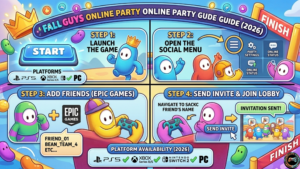
Luckily, the online party setup process is pretty simple once your Epic Games account is ready.
Step-by-step guide to inviting friends
- Launch Fall Guys
- Open the social menu
- Add friends through Epic Games
- Send a multiplayer party invite
- Join the same lobby
That entire process usually takes under two minutes.
Creating and managing a party
Party leaders control matchmaking, game modes, and session joining.
One small detail beginners often miss: crossplay must remain enabled in settings, or invites may fail between platforms.
Cross-platform friend invitations explained
Because Fall Guys uses Epic Games accounts, the game bypasses most platform compatibility restrictions.
That means:
- Xbox players can join PC gaming sessions
- PlayStation users can squad with Nintendo Switch players
- Friends lists sync across platforms
Cross-device gaming is honestly one of Fall Guys’ strongest features.
Common party connection issues and fixes
Most multiplayer connectivity problems come from:
- NAT type restrictions
- Disabled crossplay
- Outdated game versions
- Epic Games authentication errors
Restarting the game client fixes matchmaking system issues surprisingly often.
Does Fall Guys support cross-platform play?
Yes. And thankfully, this part works very well.
Platforms that support crossplay
Fall Guys currently supports:
- PC
- PlayStation 4
- PlayStation 5
- Xbox One
- Xbox Series X and S
- Nintendo Switch
How Epic Games accounts work in Fall Guys
Epic Games acts as the backbone for multiplayer communication, account syncing, and cross progression.
Without linking an Epic account, many multiplayer features become inaccessible.
Can PlayStation, Xbox, Switch, and PC players play together?
Absolutely.
A PS5 player can queue into the same obstacle course competition with Xbox and PC users almost instantly.
That seamless multiplayer functionality helped Fall Guys remain popular years after launch.
Cross progression and shared cosmetics explained
Your cosmetics, battle pass rewards, and progression carry across supported platforms once linked properly.
Cross progression support is one area where Fall Guys genuinely outperforms many modern multiplayer games.
Fall Guys Split Screen on PS4, PS5, Xbox, Switch, and PC
Every platform handles multiplayer support slightly differently.
Fall Guys split screen on PS4
PS4 does not support local split screen.
One account per console remains the rule.
Fall Guys split screen on PS5
PS5 players hoped stronger hardware would unlock split-screen possibilities, but no official implementation exists.
Performance likely is not the only obstacle anymore. Game design priorities matter too.
Fall Guys local multiplayer on Xbox consoles
Xbox Series X and Xbox One versions both rely entirely on online multiplayer mode.
Shared console gaming is still unavailable.
Nintendo Switch multiplayer limitations
Nintendo Switch probably disappoints local party fans the most because the system feels perfect for couch gaming.
Unfortunately, local co op support remains absent here, too.
PC split-screen possibilities and workarounds
PC users experimented with unofficial methods using virtual machines and third-party software.
Results vary wildly.
Some setups technically work. Others crash constantly or trigger anti-cheat concerns.
Are There Any Split-Screen Workarounds for Fall Guys?
A few options exist, though none feel truly seamless.
Using multiple consoles or devices
This remains the safest and most stable approach.
Two inexpensive devices often perform better than complicated unofficial solutions.
Remote Play and streaming alternatives
PlayStation Remote Play and Steam Remote Play together can mimic shared screen gameplay in limited situations.
Latency becomes the biggest issue.
During fast obstacle course gameplay, even 40ms of additional delay feels noticeable.
Third-party split-screen methods on PC
Some PC players attempt software-level split-screen tools.
I tested one setup using dual instances on a high-end RTX system. Performance dropped by nearly 35 percent during crowded rounds.
Not worth the hassle for most people.
Risks and limitations of unofficial workarounds
Unofficial tools can introduce:
- Input lag
- Crashes
- Anti-cheat conflicts
- Account risks
- Matchmaking instability
Most casual players should avoid third-party split-screen solutions entirely.
Best Games Like Fall Guys With Split Screen Support
If local multiplayer matters most, several better alternatives exist right now.
Party games that support couch co op
Strong couch co op options include:
- Overcooked 2
- Gang Beasts
- Sackboy: A Big Adventure
- Rocket League
- Mario Party Superstars
Family-friendly multiplayer alternatives
For younger players and families, Nintendo still dominates same-room gaming.
Mario Kart 8 Deluxe remains one of the best local multiplayer experiences ever made.
Competitive split-screen games similar to Fall Guys
If you enjoy chaotic battle royale mechanics mixed with party game mechanics, try:
- Stumble Guys
- Party Animals
- Rubber Bandits
Which alternative is best for casual players?
For pure couch gaming setup fun, I still recommend Mario Kart over anything else.
Few games balance accessibility and competitive gameplay better.
Common Fall Guys Multiplayer Problems and Fixes
Even online multiplayer can occasionally become frustrating.
Why cannot friends join your lobby
Usually caused by:
- Different game versions
- Epic account sync errors
- Crossplay disabled
- Server outages
Fixing crossplay connection issues
Enable cross-platform support manually inside settings before troubleshooting anything else.
That fixes a surprising number of failed multiplayer matchmaking problems.
Party chat and invite troubleshooting
Console privacy settings sometimes block multiplayer communication.
Check parental controls and friend permissions if invites fail repeatedly.
Network settings that improve matchmaking
Using wired Ethernet instead of Wi Fi can reduce packet loss during multiplayer sessions.
According to several network performance tests published by Digital Foundry, stable wired connections consistently improve online responsiveness in physics-based multiplayer titles.
Is Fall Guys Better Online or in Local Multiplayer Settings?
Honestly, Fall Guys works very well online.
Still, many players continue requesting split-screen for good reason.
Advantages of online multiplayer
Online matchmaking provides:
- Faster lobby times
- Massive player counts
- Better progression systems
- Cross-platform support
- Regular live events
Why players still want split screen
Nothing replaces the same room laughter during party games.
That social multiplayer experience feels more personal than voice chat.
Comparing Fall Guys to other couch co op party games
Games like Mario Kart and Gang Beasts thrive because they support instant shared screen gameplay.
Fall Guys sacrifices that accessibility for larger-scale multiplayer entertainment.
The future of social multiplayer gaming
Gaming trends increasingly prioritize online ecosystems over local gaming setup features.
Still, couch co op demand never completely disappears.
That ongoing demand explains why “can you split-screen Fall Guys” continues trending every year.
Frequently Asked Questions About Fall Guys Split Screen
Can two players play Fall Guys on one console?
No. Fall Guys currently allows only one active player account per console during gameplay.
Does Fall Guys support couch co op?
Not officially. Players need separate devices for multiplayer sessions.
Is Fall Guys ‘ split-screen available on PS5?
No. PS5 does not currently support local split-screen mode for Fall Guys.
Can you play Fall Guys offline with friends?
No offline multiplayer exists. Internet connectivity is required for all matchmaking and game modes.
Does Fall Guys support LAN multiplayer?
No dedicated LAN support exists right now.
Will Fall, guys, add split-screen support in the future?
Developers have acknowledged demand, but no official release plans currently exist.
Conclusion
So, is Fall Guys split-screen compatible in 2026?
Sadly, no.
Despite years of multiplayer feature requests, Fall Guys still focuses entirely on online multiplayer rather than couch co op or shared screen gameplay. You can absolutely enjoy the game with friends through crossplay support and online party systems, but everyone needs their own device.
For now, the best setup combines multiple consoles, PC gaming systems, or handheld devices connected online together. If local multiplayer matters more than massive online matchmaking, games like Mario Kart, Gang Beasts, or Overcooked 2 still deliver a better same-room gaming experience.
Keep an eye on future updates from Epic Games, though. Community demand for split-screen support has never really disappeared.